R Basics

http://rafalab.dfci.harvard.edu/dsbook-part-1/R/R-basics.html

Packages

  • base comes from the installation of R.

  • add-on packages that can be obtained from CRAN

  • Use install.packages to install the dslabs package from CRAN

  • Try: sessionInfo, installed.packages

Prebuilt functions

  • R base includes automatically loaded packages: stats, graphics, grDevices, utils, datasets, methods.

  • Very popular packages not included in R base: ggplot2, dplyr, tidyr, and data.table, caret, etc. They can be installed on the fly when RStudio prompts.

Base R functions

  • Examples: ls, rm, library, search, factor, list, exists, str, typeof, and class.

  • You can see the raw code for a function by typing its name without the parentheses.

    • type ls on your console to see an example.

Help system

  • You can learn about function using
help("ls")

or

?ls
  • many packages provide vignettes that are like how-to manuals for different analyses

Variables

  • Define a variable.
a <- 2
  • Use ls to see if it’s there. Also take a look at the Environment tab in RStudio.
ls()
[1] "a"               "has_annotations"
  • Use rm to remove the variable you defined.
rm(a)

The workspace

  • each time start R, a new (clean slate) workspace that does not have any variables or libraries is loaded

  • when exit R you will be asked if you want to save the workspace

    • In most cases, always better off saying NO
  • if you save a workspace it will be saved as a hidden file .Rdata and whenever R is started in a directory with a saved workspace then that workspace will be re-instantiated and used

The search paths

search() # return the search path that R checks in order
[1] ".GlobalEnv"        "package:stats"     "package:graphics" 
[4] "package:grDevices" "package:utils"     "package:datasets" 
[7] "package:methods"   "Autoloads"         "package:base"     
  • Two functions have the same name will be searched in the order defeined in the search path.
  • When you run
library(deplyr)

package deplyr is added near the top of the search path.

Variable naming convention

  • use meaningful words (nouns) that describe what is stored, only lower case, and underscores, no spaces.

  • Do not use the period . in variable names. R may treat it differently and those can cause unintended actions

  • For more this guide.

Main data types

  • One dimensional vectors: double, integer, logical, complex, characters.

  • integer and double are both numerical

  • Factors (categorical variables): take finite discrete values

  • Lists: this includes data frames.

  • Arrays (matrices): all elements are of the same type

  • Date and time

  • tibble (comes from tidyverse, behaves like a dataframe, print friendly, no automatic type change, avoids silent bugs)

  • S3 objects (default R system, flexible, but can be fragile) vs. S4 objects (srongly typed classes, avoid silent bugs)
Data types

  • str stands for structure, gives us information about an object.

  • typeof gives you the lower-level data storage type of the object: double, integer, char, logical, list, closure(functions), enviroment.

  • class returns the object-oriented class attribute of an object at a higher level, often user-facing level.

typeof and class

d <- as.Date("2026-02-02")
typeof(d)  # "double"
[1] "double"
class(d)   # "Date"
[1] "Date"
unclass(d) # a number (days since 1970-01-01)
[1] 20486
d <- as.Date("2026-02-02")
typeof(d)  # "double"
[1] "double"
class(d)   # "Date"
[1] "Date"
unclass(d) # a number (days since 1970-01-01)
[1] 20486

Data types

Let’s see some example:

library(dslabs)
typeof(murders)
[1] "list"
class(murders)
[1] "data.frame"
str(murders)
'data.frame':   51 obs. of  5 variables:
 $ state     : chr  "Alabama" "Alaska" "Arizona" "Arkansas" ...
 $ abb       : chr  "AL" "AK" "AZ" "AR" ...
 $ region    : Factor w/ 4 levels "Northeast","South",..: 2 4 4 2 4 4 1 2 2 2 ...
 $ population: num  4779736 710231 6392017 2915918 37253956 ...
 $ total     : num  135 19 232 93 1257 ...
dim(murders)
[1] 51  5

Data frames

  • Data frames are the most common class used in data analysis.

  • Data frames are like a matrix, but where the columns can have different types.

  • Usually, rows represents observations and columns variables.

  • you can index them like you would a matrix, x[i, j] refers to the element in row i column j

  • You can see part of the content like this

head(murders)
       state abb region population total
1    Alabama  AL  South    4779736   135
2     Alaska  AK   West     710231    19
3    Arizona  AZ   West    6392017   232
4   Arkansas  AR  South    2915918    93
5 California  CA   West   37253956  1257
6   Colorado  CO   West    5029196    65

View a Data frames

View(murders)

Add a column

murders$pop_rank <- rank(murders$population)
head(murders)
       state abb region population total pop_rank
1    Alabama  AL  South    4779736   135       29
2     Alaska  AK   West     710231    19        5
3    Arizona  AZ   West    6392017   232       36
4   Arkansas  AR  South    2915918    93       20
5 California  CA   West   37253956  1257       51
6   Colorado  CO   West    5029196    65       30

Data frames: Accessor $

  • $ is called an accessor because it lets us access columns.
murders$population
 [1]  4779736   710231  6392017  2915918 37253956  5029196  3574097   897934
 [9]   601723 19687653  9920000  1360301  1567582 12830632  6483802  3046355
[17]  2853118  4339367  4533372  1328361  5773552  6547629  9883640  5303925
[25]  2967297  5988927   989415  1826341  2700551  1316470  8791894  2059179
[33] 19378102  9535483   672591 11536504  3751351  3831074 12702379  1052567
[41]  4625364   814180  6346105 25145561  2763885   625741  8001024  6724540
[49]  1852994  5686986   563626
  • More generally: $ can be used to access named components of a list.

Alternative ways to access columns (confusing)

murders$population
murders[, "population"]
murders[, 4] 
murders[["population"]]
murders[[4]]
  • In general, using the name rather than the number as adding or removing columns will change index values, but not names.

Gotcha

Compare

murders$population
murders[, "population"]
murders[["population"]] # access the column content
murders['population']   # access the column as a data frame
class(murders['population'])
[1] "data.frame"
class(murders[["population"]])
[1] "numeric"

with clause

  • with let’s us use the column names as symbols to access the data.
rate <- with(murders, total/population)
  • Note you can write entire code chunks by enclosing it in curly brackets:
with(murders, {
   rate <- total/population
   rate <- round(rate*10^5)
   print(rate[1:5])
})
[1] 3 3 4 3 3

Atomic vectors

  • The columns of data frames are one dimensional (atomic) vectors.

  • An atomic vector is a vector where every element must be the same type.

length(murders$population)
[1] 51
typeof(murders$population)
[1] "double"

Create vectors

  • USe the concatenate function c by listing its members.
x <- c("s", "t", "a", "t",  " ", "3", "0", "0","0")
  • We access the elements using []
x[5]
[1] " "
typeof(x[5])
[1] "character"
x[12]
[1] NA
  • NOTE R does not do array bounds checking…it silently pads with missing values

Sequences

  • Sequences are vectors with equally spaced elements.
seq(1, 10)
 [1]  1  2  3  4  5  6  7  8  9 10
seq(1, 9, by=3)  # why the output?
[1] 1 4 7
  • When you want a sequence that increases/decreases by 1 you can use the colon :
1:10
 [1]  1  2  3  4  5  6  7  8  9 10
3.3:7.8
[1] 3.3 4.3 5.3 6.3 7.3
4:-1
[1]  4  3  2  1  0 -1

Sequences

  • To quickly generate a sequence the same length as a vector x is seq_along(x) cf. 1:length(x)
x <- c("b", "s", "t", " ", "2", "6", "0")
seq_along(x)
[1] 1 2 3 4 5 6 7
for (i in seq_along(x)) {
  cat(toupper(x[i])) #concatenate and print
}
BST 260
  • But if the length of x is zero, then using 1:length(x) does not work for the above loop
w = x[x=="W"]
print(w) # w=charactor(0): a char vector of length 0. 
character(0)
1:length(w) # a sequence [1 0]
[1] 1 0
seq_along(w) # an integer vector of legnth 0
integer(0)

Data types and coercion

  • double, integer, logical, complex, characters and numeric

  • Each basic type has its own version of NA (a missing value)

  • testing for types: is.TYPE,

  • coercing : as.TYPE, will result in NA if it is not possible

is.numeric("a")
[1] FALSE
is.double(1L)
[1] FALSE
as.double("6")
[1] 6
as.numeric(x) + 3
[1] NA NA NA NA  5  9  3
typeof(1:10)
[1] "integer"

Coercing

  • When you do something inconsistent with data types, R tries to figure out what you mean and change it accordingly.

  • We call this coercing.

  • R does not return an error and in some cases does not return a warning either.

  • This can cause confusion and unnoticed errors.

Vector types and coercion

  • coercion is automatically performed when it is possible
  • coercison hierarchy: logical → integer → double → character
  • TRUE coerces to 1 and FALSE to 0
  • but any non-zero integer coerces to TRUE, only 0 coerces to FALSE
  • as.logical converts 0 and only 0 to FALSE, everything else to TRUE
  • the character string “NA” is not a missing value
typeof(1:10 + 0.1)
[1] "double"
typeof(TRUE+1) # 1 is double by default in R; integer must be `1L`
[1] "double"
as.character(TRUE)
[1] "TRUE"
as.numeric(TRUE)
[1] 1
as.logical(1)
[1] TRUE
as.logical(.5)
[1] TRUE

More coercing examples

typeof(1L)
[1] "integer"
typeof(1)
[1] "double"
typeof(1 + 1L)
[1] "double"
c("a", 1, 2)
[1] "a" "1" "2"
TRUE + FALSE
[1] 1
factor("a") == "a" #`==` compare values
[1] TRUE
identical(factor("a"), "a") #check if they are the same objects
[1] FALSE

When coercing fails

  • When R can’t figure out how to coerce, rather an error it returns an NA:
as.numeric("a")
[1] NA
  • Note that including NAs in arithmetical operations usually returns an NA.
1 + 2 + NA
[1] NA

Explicitly coercing

  • Most coercion functions start with as.
x <- factor(c("a","b","b","c"))
print(x)
[1] a b b c
Levels: a b c
as.character(x)
[1] "a" "b" "b" "c"
as.numeric(x)
[1] 1 2 2 3

Coercing and parsing by readr

  • The readr package provides some tools for trying to parse
x <- c("12323", "12,323")
as.numeric(x)
[1] 12323    NA
library(readr)
parse_guess(x)
[1] 12323 12323

Atomic vector and array

  • Atomic vector is 1-D, contains only one type of data, has no dimensions (1dim =NULL`).
x_num  <- c(1, 2, 3)
x_chr  <- c("a", "b", "c")
x_log  <- c(TRUE, FALSE, TRUE)

typeof(x_num) # "double"
[1] "double"
is.atomic(x_num) # TRUE
[1] TRUE
dim(x_num) # NULL
NULL
  • Array: \(\ge 2 D\), one atomic type, has dim attribute
m <- matrix(1:6, nrow = 2)
dim(m)
[1] 2 3
# 2 3

is.atomic(m) # TRUE   (important!)
[1] TRUE

Factors and Characters

  • The murder dataset has examples of both.
class(murders$state)
[1] "character"
class(murders$region)
[1] "factor"

What is a factor?

  • A factor is a R representation for a categorical variable, that has a fixed set of non-numeric values

    • ex: Sex has Male and Female in the murders dataset
  • usually not good for variables that have lots of levels (like state names in the murders dataset)

  • Internally a factor is stored as the unique set of labels (called levels) and an integer vector with values in 1 to length(levels)

    • the ith entry corresponds to the kth element of the levels
  • Usually order does not matter, but if it does you can have ordered factors.

x <- murders$region
levels(x) # default order is lexicographical
[1] "Northeast"     "South"         "North Central" "West"         

Setting Levels

  • you can set up the levels (order) as you would like, when creating a factor

  • if you do not set them up, then they will be created in lexicographic order (in the locale you are using)

x = sample(c("Male", "Female"), 50, replace =TRUE)
y1 = factor(x, levels=c("Male", "Female"))
y2 = factor(x, levels = c("Female", "Male"))
y1[1:10]
 [1] Female Male   Female Female Female Male   Male   Male   Male   Male  
Levels: Male Female
y2[1:10]
 [1] Female Male   Female Female Female Male   Male   Male   Male   Male  
Levels: Female Male

The previous example continued

x = sample(c("Male", "Female"), 50, replace =TRUE)
y1 = factor(x, levels=c("Male", "Female"))
y2 = factor(x, levels = c("Female", "Male"))
y1[1:10]
 [1] Male   Female Female Female Female Female Male   Male   Male   Female
Levels: Male Female
y2[1:10]
 [1] Male   Female Female Female Female Female Male   Male   Male   Female
Levels: Female Male
y1==y2 # value comparison
 [1] TRUE TRUE TRUE TRUE TRUE TRUE TRUE TRUE TRUE TRUE TRUE TRUE TRUE TRUE TRUE
[16] TRUE TRUE TRUE TRUE TRUE TRUE TRUE TRUE TRUE TRUE TRUE TRUE TRUE TRUE TRUE
[31] TRUE TRUE TRUE TRUE TRUE TRUE TRUE TRUE TRUE TRUE TRUE TRUE TRUE TRUE TRUE
[46] TRUE TRUE TRUE TRUE TRUE
identical(y1,y2) # object comparison
[1] FALSE

Categories based on strata

  • The function cut bins a numeric vector into intervals and returns a factor
age <- c(5, 93, 18, 102, 14, 22, 45, 65, 67, 25, 30, 16, 21)
cut(age, c(0, 11, 27, 43, 59, 78, 96, Inf)) # number of categories =length(breaks)-1=7
 [1] (0,11]   (78,96]  (11,27]  (96,Inf] (11,27]  (11,27]  (43,59]  (59,78] 
 [9] (59,78]  (11,27]  (27,43]  (11,27]  (11,27] 
Levels: (0,11] (11,27] (27,43] (43,59] (59,78] (78,96] (96,Inf]
# cut(age,
#     c(0,11,27,43,59,78,96,Inf),
#     labels = c("Child","Young","Adult","Mid","Senior","Old","Very Old"))
cut(age, breaks, right = FALSE) # ->[a,b)
cut(age, breaks, include.lowest = TRUE) # include the lowest age 0

Assigning labels

  • We can assign more meaningful level names:
age <- c(5, 93, 18, 102, 14, 22, 45, 65, 67, 25, 30, 16, 21)
cut(age, c(0, 11, 27, 43, 59, 78, 96, Inf), 
    labels = c("Alpha", "Zoomer", "Millennial", "X", "Boomer", "Silent", "Greatest"))
 [1] Alpha      Silent     Zoomer     Greatest   Zoomer     Zoomer    
 [7] X          Boomer     Boomer     Zoomer     Millennial Zoomer    
[13] Zoomer    
Levels: Alpha Zoomer Millennial X Boomer Silent Greatest

Changing levels

  • This is often needed for ordinal data because R defaults to alphabetical order
gen <- factor(c("Alpha", "Zoomer", "Millennial"))
levels(gen)
[1] "Alpha"      "Millennial" "Zoomer"    
  • You can change this with the levels argument:
gen <- factor(gen, levels = c("Alpha", "Zoomer", "Millennial", "X", "Boomer", "Silent", "Greatest"))
levels(gen)
[1] "Alpha"      "Zoomer"     "Millennial" "X"          "Boomer"    
[6] "Silent"     "Greatest"  

Reference level

  • A common reason we want to change levels is to assure R uses the correct reference strata.

  • This is important for linear models (lm) because the first level is assumed to be the reference.

x <- factor(c("no drug", "drug 1", "drug 2"))
levels(x)
[1] "drug 1"  "drug 2"  "no drug"
x <- relevel(x, ref = "no drug") 
# factor(c("no drug", "drug 1", "drug 2"), levels = c("no drug", "drug 1", "drug 2"))
levels(x)          
[1] "no drug" "drug 1"  "drug 2" 

Reorder a factor (categorical) variable

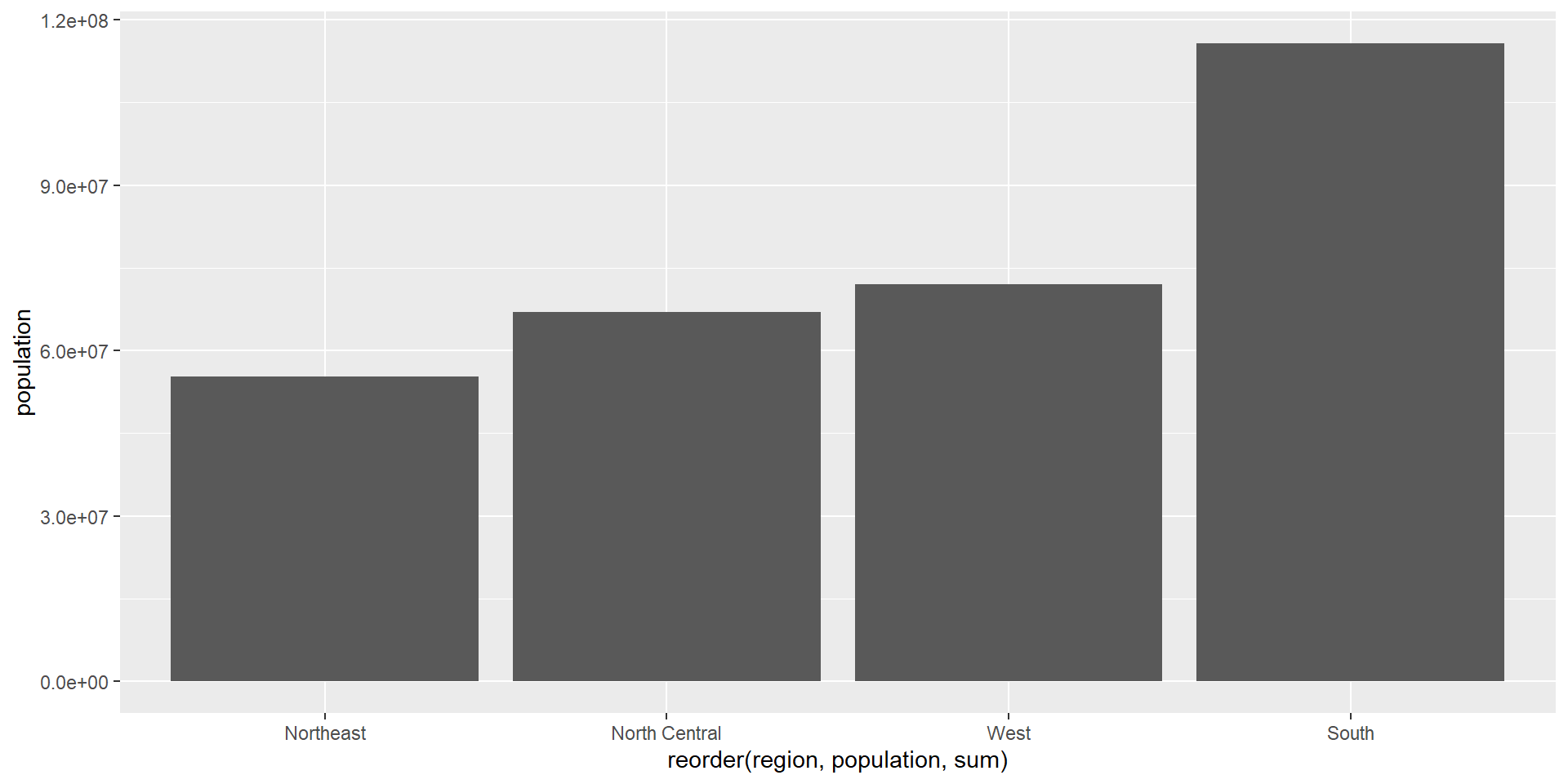
  • We often want to order strata (factor) based on a summary statistic.
x <- reorder(murders$region, murders$population, sum) #reorder(x,by, FUN)
#order the regions by their total populations by ascedning (default)
# reorder(murders$region, murders$population, sum, decreasing = TRUE)
library(ggplot2)
ggplot(murders, aes(x = reorder(region, population, sum),
                    y = population)) +
  geom_bar(stat = "summary", fun = "sum") #summarize y for each x using "sum"

Factors (integers) use less memory

x <- sample(murders$state[c(5,33,44)], 10^7, replace = TRUE) #sample(x,size,replace)
y <- factor(x)
object.size(x)
80000232 bytes
object.size(y)
40000648 bytes
length(x) #  10000000
[1] 10000000
table(x) / length(x) #≈ 0.333, 0.333, 0.333
x
California   New York      Texas 
 0.3335301  0.3332706  0.3331993 
# table counts the frequency of each unique value

Factors can be confusing

x <- factor(c("3","2","1"), levels = c("3","2","1"))
as.numeric(x)
[1] 1 2 3
x[1]
[1] 3
Levels: 3 2 1
levels(x[1])
[1] "3" "2" "1"
table(x[1])

3 2 1 
1 0 0 

Drop extra levels with droplevels

z <- x[1]
z <- droplevels(z)
z
[1] 3
Levels: 3
  • But note what happens if we change to another level:
z[1] <- "1" # Factors only allow values that exist in levels(z)
z
[1] <NA>
Levels: 3

NAs and NULLs

  • NA stands for not available and represents missing data.

  • In R there is a different kind of NA for each of the basic vector data types.

  • NULL, represents a zero length list and is often returned by functions or expressions that do not have a specified return value

Checking NAs by is.na

library(dslabs)
na_example[1:20]
 [1]  2  1  3  2  1  3  1  4  3  2  2 NA  2  2  1  4 NA  1  1  2
  • The is.na function is key for dealing with NAs
is.na(na_example[1])
[1] FALSE
is.na(na_example[17])
[1] TRUE
is.na(NA)
[1] TRUE
is.na("NA")
[1] FALSE

NAs and logical operators

  • logical operators like and (&) and or (|) coerce their arguments when needed and possible
  • the logical operators do “lazy” evaluation, from left to right
TRUE & NA
[1] NA
TRUE & 0
[1] FALSE
TRUE | NA
[1] TRUE

NaNs and Inf

  • NaN: Not a Number

  • NaN is a double, coercing it to integer yields an NA

  • Inf and -Inf represent values of infinity and minus infinity

0/0
[1] NaN
class(0/0)
[1] "numeric"
sqrt(-1)
[1] NaN
log(-1)
[1] NaN
1/Inf
[1] 0
Inf-Inf
[1] NaN

Lists

  • Data frames are a type of list.

  • Lists permit components of different types and, unlike data frames, different lengths:

x <- list(name = "John", id = 112, grades = c(95, 87, 92))
  • The JSON format is best represented as list in R.

Access compoenents of a list

  • You can access components in different ways:
x$name
[1] "John"
x[[1]]
[1] "John"
x[["name"]]
[1] "John"

subset(sublist)[] and extraction [[]]

x$name == x[[1]]
[1] TRUE
class(x[[1]])
[1] "character"
x[1]
$name
[1] "John"
class(x[1])
[1] "list"
x[[1]] == x[1]
name 
TRUE 
identical(x[1],x[[1]])
[1] FALSE

Matrices: Faster computation

  • similar to data frames except all entries need to be of the same type.
mat <- matrix(1:12, 4, 3)
mat
     [,1] [,2] [,3]
[1,]    1    5    9
[2,]    2    6   10
[3,]    3    7   11
[4,]    4    8   12
mat[2, 3]  # 10
[1] 10
mat[2,]
[1]  2  6 10
mat[,3]
[1]  9 10 11 12
mat[,2:3]
     [,1] [,2]
[1,]    5    9
[2,]    6   10
[3,]    7   11
[4,]    8   12
mat[1:2,2:3]
     [,1] [,2]
[1,]    5    9
[2,]    6   10
as.data.frame(mat)
  V1 V2 V3
1  1  5  9
2  2  6 10
3  3  7 11
4  4  8 12

Define a customized functions

f <- function(x, y, z = 0){
  ### do calculations with x, y, z to compute object
  return(object)
}
  • positional arguments, keyword arguments

  • arguments are matched by either exact name (which takes precedence) or position

  • returned value: the value specified in a call to return or the value of the last statement evaluated

Functions

  • any symbol found in the body of the function that does not match an argument has to be matched to a value by a process called scoping
x <-10
s <- function(n){
  print(x)
   return(sum(1:n))
}
s(2)
[1] 10
[1] 3

R matches named arguments first, positional arguments last

f <- function(a, b, c) {
  c(a, b, c)
}

f(1, c = 3, 2)
[1] 1 2 3
mean(na.rm = TRUE, c(1, NA, 3))
[1] 2
f <- function(a, b, c) a + b + c
f(1, 2, c = 3, b = 4)
# Error in f(1, 2, c = 3, b = 4) : unused argument (2)

Flow-control and operators

  • if/else; while; repeat; for; break; next
  • you can read the manual pages by calling help or using ? (sometimes you must quote the argument)
 help("for")
 ?"break"
 ?"&"
 ?"/"

if-else

a <- 0

if (a != 0) {
  print(1/a)
} else{
  print("No reciprocal for 0.")
}
[1] "No reciprocal for 0."
a <- 0
ifelse(a > 0, 1/a, NA)
[1] NA
#> [1] NA

For loop

for (i in 1:3) {
  print(i)
}
[1] 1
[1] 2
[1] 3
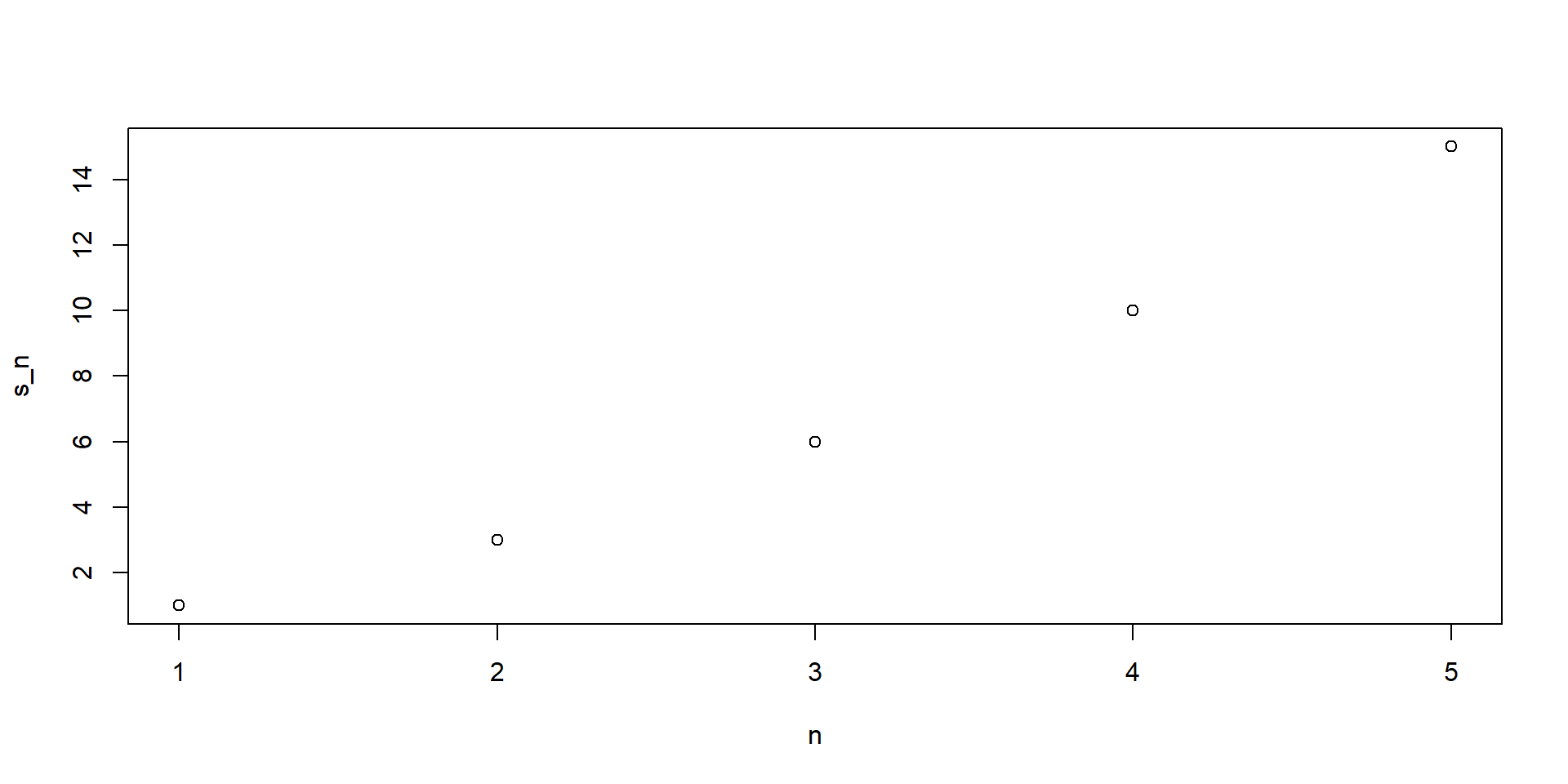
compute_s_n <- function(n) { 
  sum(1:n)
}
m <- 5
s_n <- vector(length = m) # create an empty vector
for (n in 1:m) {
  s_n[n] <- compute_s_n(n)
}
n <- 1:m
plot(n, s_n)

Logical Operators & and |

  • & and | perform element-wise comparison; use for vector oprations, filtering, subsetting
x <- c(TRUE, FALSE, TRUE)
y <- c(TRUE, TRUE, FALSE)

x & y
[1]  TRUE FALSE FALSE
x | y
[1] TRUE TRUE TRUE
  • Typical use: Subsetting
x[x > 0 & x < 10]

Logical operators && and ||

  • && and || lazy eval (short-circuit), move left to right and return when the result is determined. Use for if, while, and guards
x <- c(TRUE, FALSE)
y <- c(FALSE, TRUE)

x && y  # wrong. Each side must return a single TRUE/FALSE

x || y #wrong
if (x > 0 & x < 10) { ... } # wrong
if (x > 0 && x < 10) { ... } # wrong if x is a vector of length >1

Arithmetic Operators

  • operators like ^ or +
  • ?Syntax will get you the manual page
  • when in doubt always use parentheses
2^1+1
[1] 3
2^(1+1)
[1] 4
TRUE || TRUE && FALSE   # is the same as
[1] TRUE
TRUE || (TRUE && FALSE) # and different from
[1] TRUE
(TRUE || TRUE) && FALSE
[1] FALSE

Function as an argument

  • in R functions are first class objects - this means they can be passed as arguments, assigned to symbols, stored in other data structures

  • in particular they can be passed as arguments to a function and returned as values

  • in some languages (e.g. C or Java) functions are not first class objects and they cannot be passed as arguments

  • Python uses a fairly similar strategy as in R

Scope

f <- function(x){
  cat("y is", y,"\n")
  y <- x
  cat("y is", y,"\n")
  return(y)
}
y <- 2
f(3)
y is 2 
y is 3 
[1] 3

Exampe: function as a returned value

  • rexp: generate values from an Exponential distribution \(f(x;\lambda)=\begin{cases} \lambda e^{-\lambda x} & x\ge 0 \\ 0 & x<0. \end{cases}\).

  • notice that a function is returned

x = rexp(100, rate = 4)

llExp = function(DATA) { #log-likelyhood
   n = length(DATA)
   sumx = sum(DATA)
   return(function(mu) {n * log(mu) - mu * sumx})
}

myLL = llExp(x)
myLL
function (mu) 
{
    n * log(mu) - mu * sumx
}
<environment: 0x0000024b1764be80>

Function call as an argument

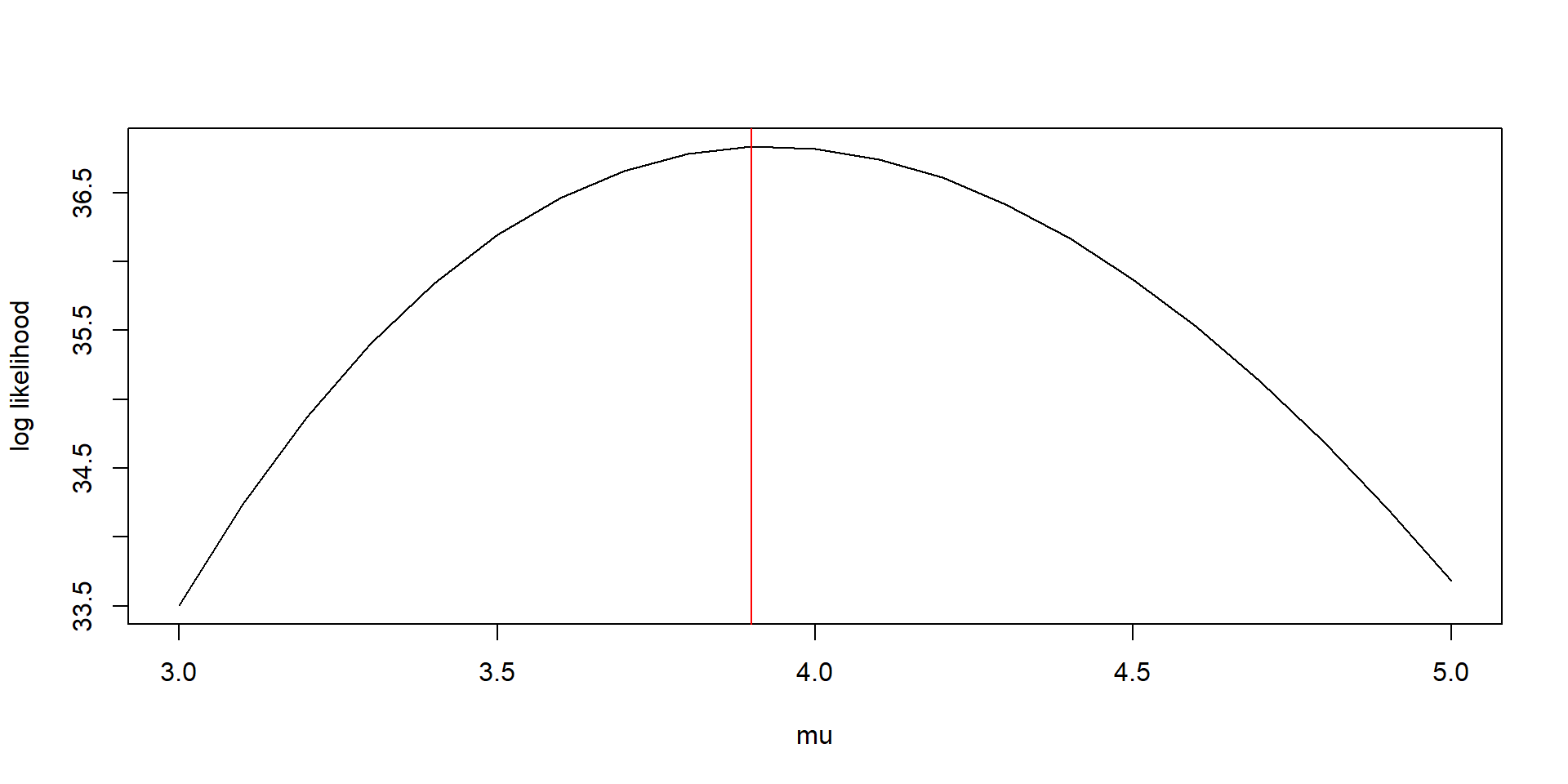
##possible values for mu
y = seq(3,5,by = 0.1)

plot(y, myLL(y), type="l", xlab="mu", ylab="log likelihood") 
# "l"-line; "p"-points(default), "b"-both; "h"-vertical lines
abline(v = y[which.max(myLL(y))], col = "red")
  • MLE occurs at mu=3.7

Order of binding

search()
filter     #stats::filter()->time-series filtering
library(dplyr)
search()
filter # dplyr::filter(): ->row filtering
  • by calling library(dplyr) the package dplyr has been put near the top of the search list. You can call search() before and after the call to library to check this.

  • users could inadvertently alter computations - and we will want to protect against that

Namespaces

  • To avoid binding conflict, using <pkgname>::<functionname>:
stats::filter
dplyr::filter

Examples

  • Restart your R Console and study this example:
library(dslabs) #attach dsplabs to the search path
exists("murders")  # `murders` exists in `dslabs`
[1] TRUE
murders <- murders # create a copy `murders` in .GlobalEnv
murders2 <- murders # 2nd copy
rm(murders) # removes `murders` from .GlobalEnv
exists("murders") #R finds it in `dslabs`
[1] TRUE
detach("package:dslabs") #remove from the search path
exists("murders") # does not exist on the search path
[1] FALSE
exists("murders2")
[1] TRUE

Object Oriented Programming

  • R uses object oriented programming (OOP).

  • Base R uses two approaches referred to as S3 and S4

  • S3, the original approach, is more common, but has some limitations

  • The S4 approach is more similar to the conventions used by the Lisp family of languages.

  • In S4 there are classes that have attributes describing data structures and methods that are functions

Object Oriented Programming

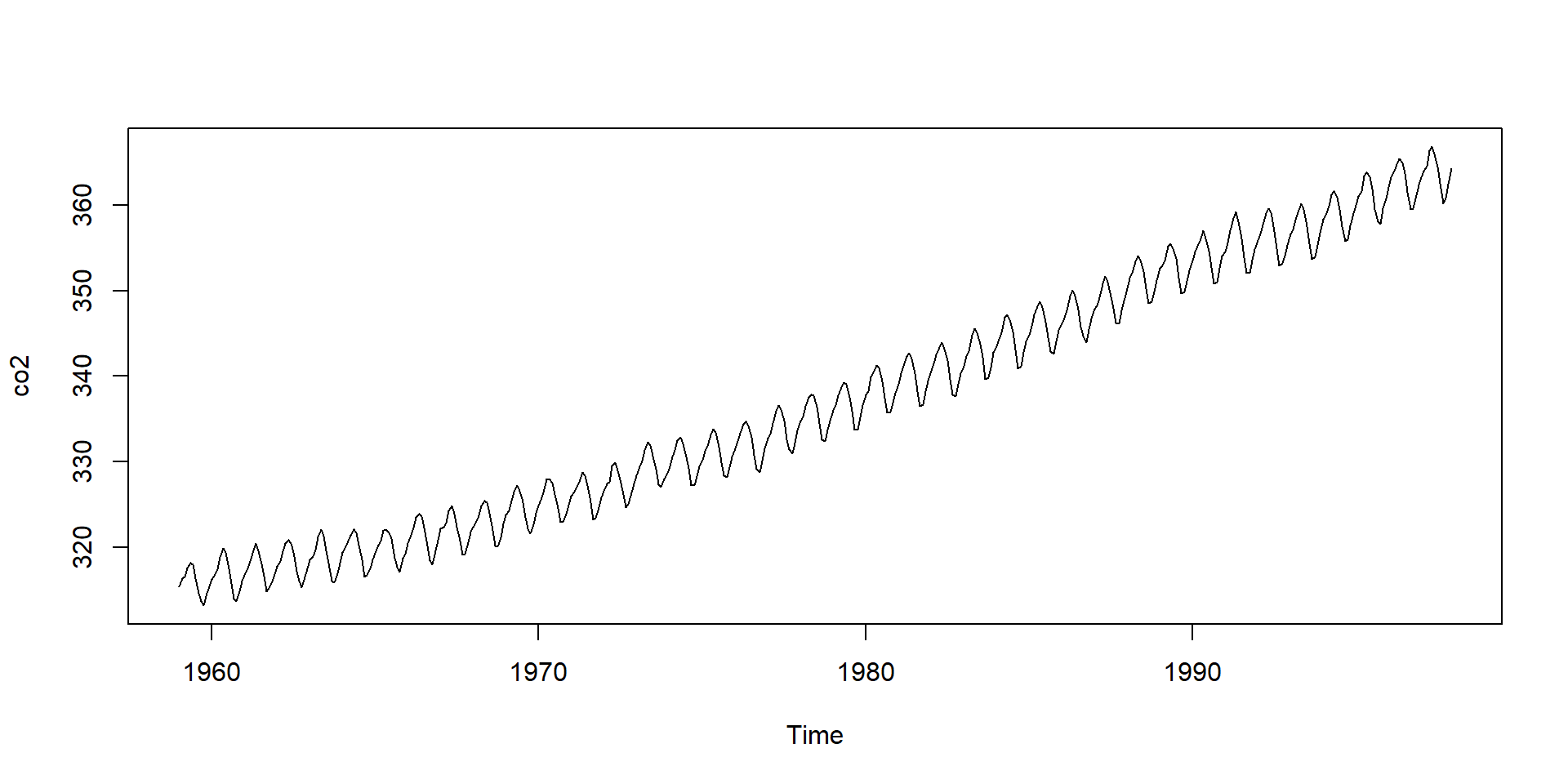
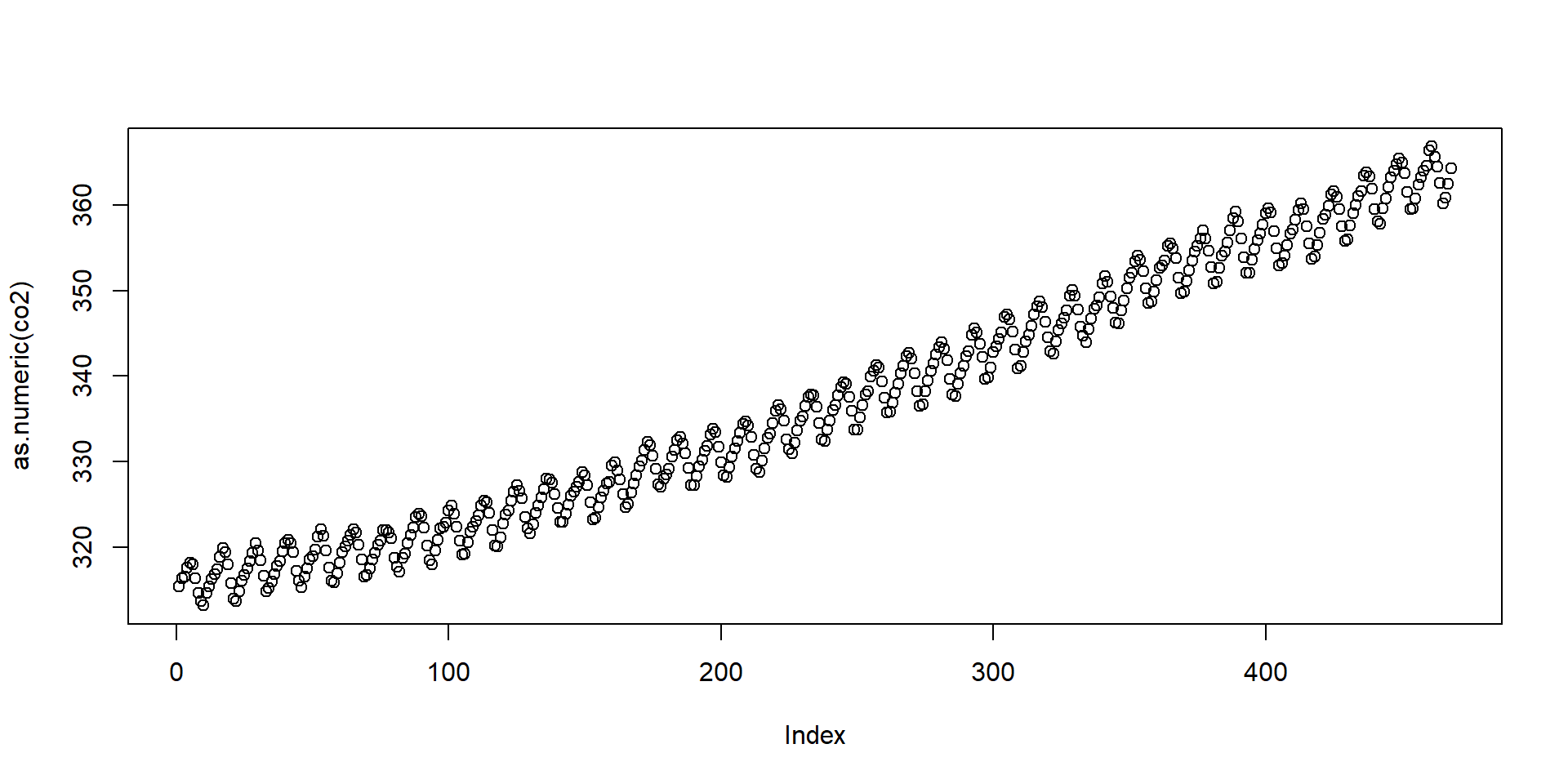
class(co2) # ts object
[1] "ts"
plot(co2) # R calls plot.ts(co2)->x-axis: year

plot(as.numeric(co2)) # strip away the time-index. R calls plot.default(). x-axix: index (1,2,3,...)

Plots

  • Soon we will learn how to use the ggplot2 package to make plots.

  • R base does have functions:

    • plot - mainly for making scatterplots.
    • lines - add lines/curves to an existing plot.
    • hist - to make a histogram.
    • boxplot - makes boxplots.
    • image - uses color to represent entries in a matrix.

Plots

  • in general, we recommend using ggplot2, R base plots are often better for quick exploratory plots.

  • For example, to make a histogram of values in x simply type:

hist(x)
  • To make a scatter plot of y versus x and then add connected line:
plot(x,y) # open a new figure (canvas)
lines(x,y) #adds connected line to an existing plot. It does not create a new figure(canvas)

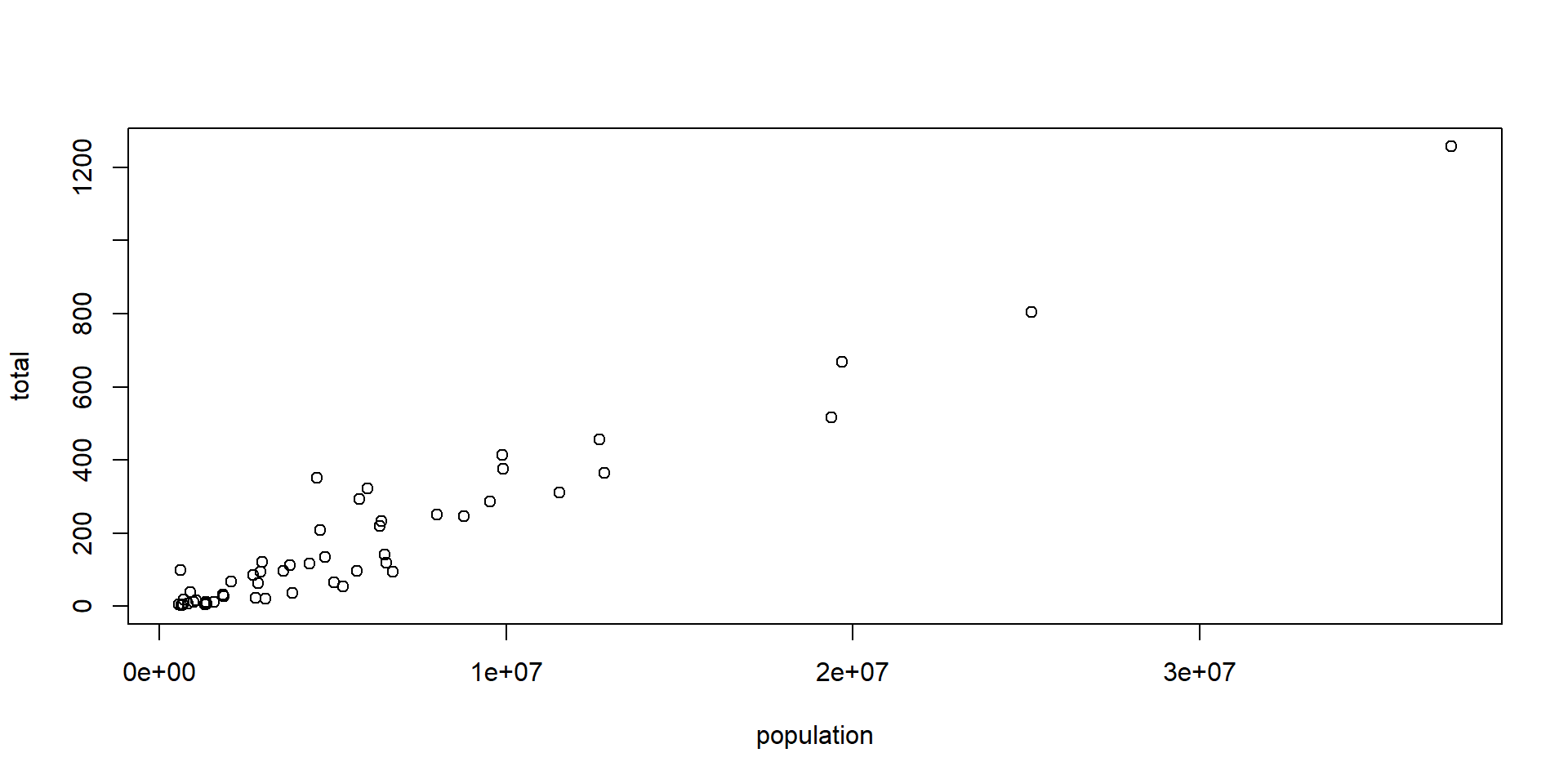
scatterplot

library(dslabs)
with(murders, plot(population, total))

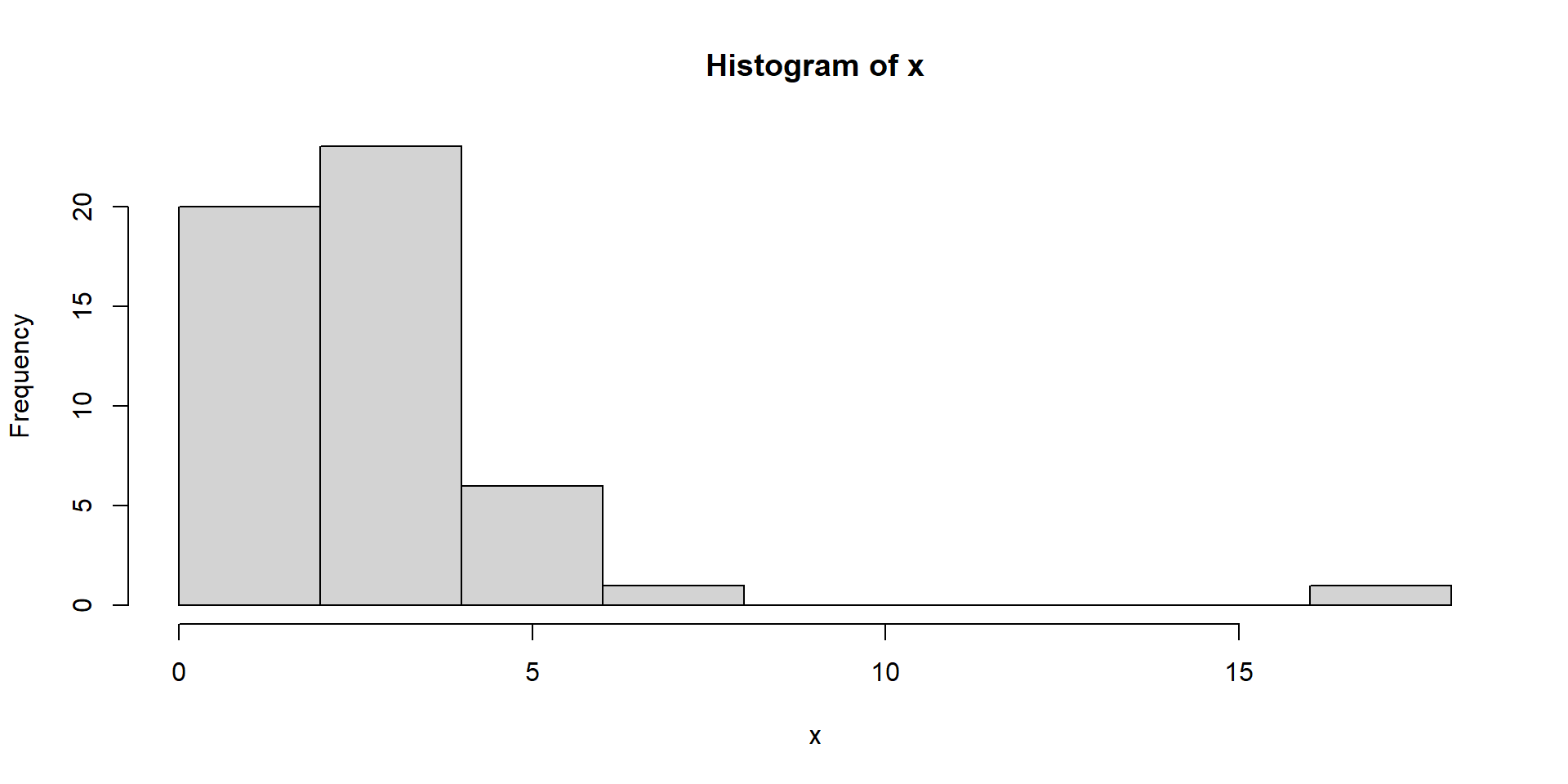
histogram

x <- with(murders, total / population * 100000)
hist(x)

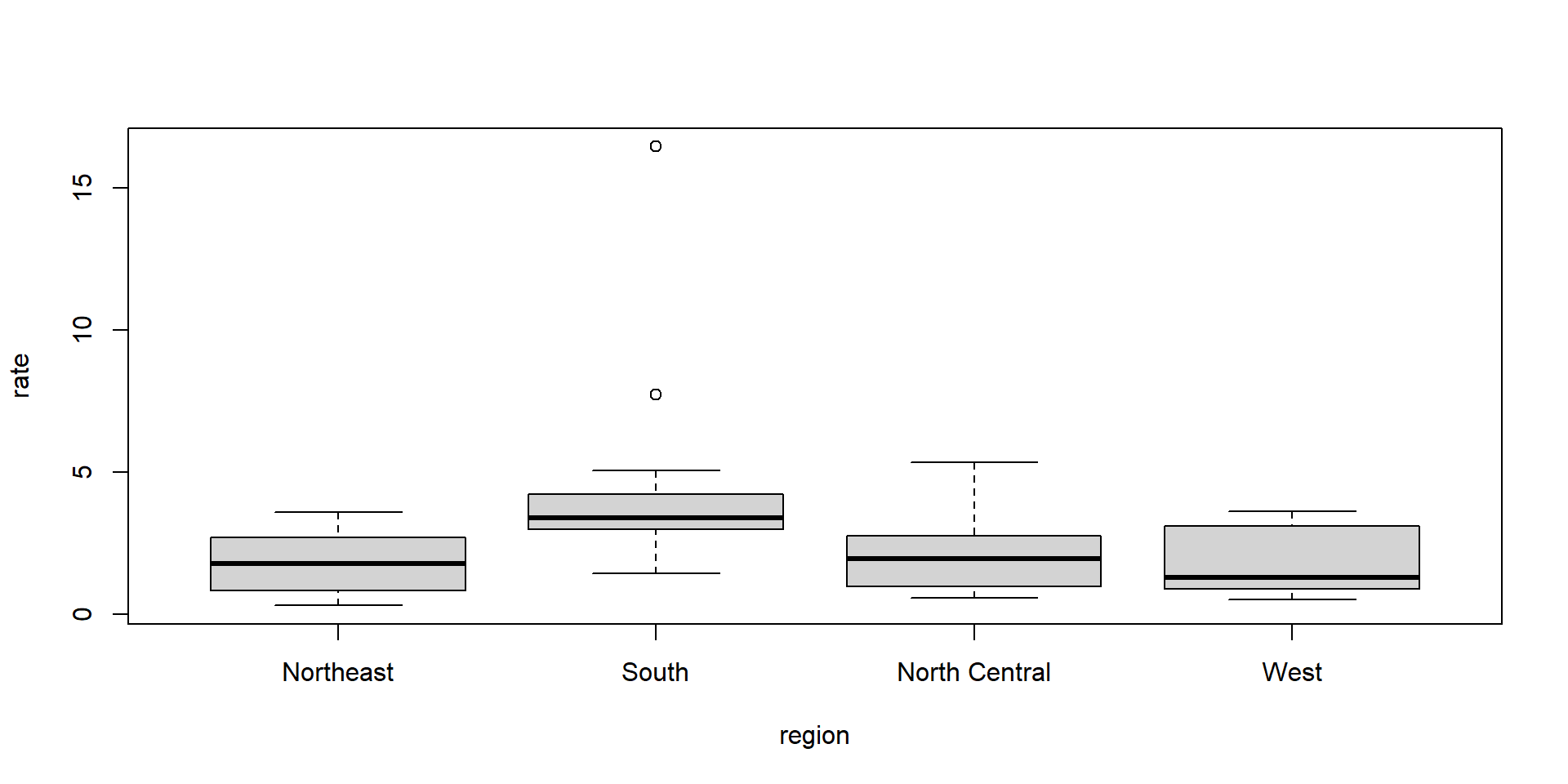
boxplot

murders$rate <- with(murders, total / population * 100000)
boxplot(rate~region, data = murders) #y:rate x:region