[1] 3RStudio IDE and Quarto
Integrated Development Environment (IDE)
https://rafalab.dfci.harvard.edu/dsbook-part-1/productivity/reproducible-projects.html
- Posit provides a free IDE for R with RStudio
- Positron (newer and adapted to LLMs)
The panes
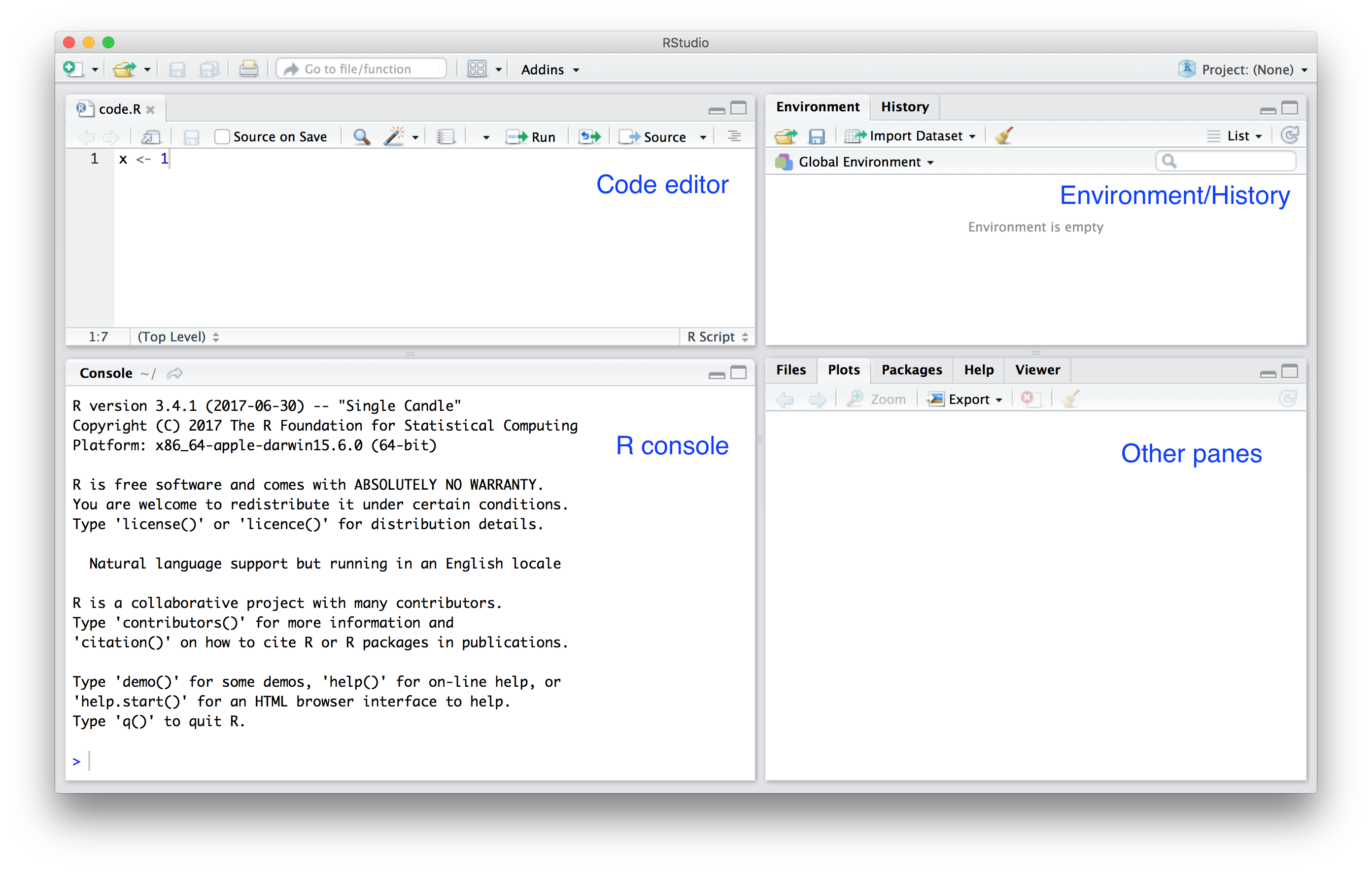
The Basics
- Open a new R script file. (example.R)
- Learn tab complete.
- Run commands while editing scripts.
- Run the entire script.
- Make a plot.
- Change options to never save workspace.
- Change IDE appearance.
Projects
- Start a new project in a new directory.
- Start a new project in an existing directory.
- Change projects.
- Use the
Filemenu to create a new Quarto document
Type of editor
we will be creating and editing markdown documents - mostly using the Quarto paradigm
for Quarto you can use either a source view or a visual view:
- Source - See the actual code (WYSIWYG)
- Visual - Partial preview of final document.
Note: You can state your preference in the header:
The header
Start a new empty document.
At the top you see:
The things between the
---are the YAML header.
Quick Markdown Text formating
*italics* or _italics_ = italics
**bold** = bold
***bold italics*** = bold italics
~~strikethrough~~ = strikethrough
`code` = code
Code chunk
This:
```
line 1
line 2
```
shows a code chunk:
line 1
line 2
Headings
You can start sections and subsections like this:
# Header 1
## Header 2
### Header 3
Links
Show the link:
<https://quarto.org/docs/guide/>Add link to text:
[Quarto Guide](https://quarto.org/docs/guide/)
Looks like this:
Images

Shows the plot and caption:

Introductory Statistics with R
- The image can also be a local file (replacing the html link with the path to the image.)
Unordered Lists
Bullets:
-   bullet 1
    -   sub-bullet 1
    -   sub-bullet 2
-   bullet 2
Looks like this:
- bullet 1
- sub-bullet 1
- sub-bullet 2
- bullet 2
Ordered Lists
Ordered list:
1.  Item 1
2.  Item 2
Looks like this:
- Item 1
- Item 2
Equations

Note
Technical report often uses LaTeX for typesetting.
There are many online tutorials, like this one.
Equations using LaTeX.
Examples:
Inline:
$Y_i = \beta_0 + \beta_1 x_i + \varepsilon_i$looks like this \(Y_i = \beta_0 + \beta_1 x_i + \varepsilon_i\)Display math:
$$
\mathbf{Y} = \mathbf{X\beta} + \mathbf{\varepsilon}
$$
looks like this:
\[ \mathbf{Y} = \mathbf{X\beta} + \mathbf{\varepsilon} \]
Code in Quarto document .qmd (or RMarkdown .rmd)
One can include and execute the code chunks in .qmd document by
Note
To add an R chunks, type the shortcut key binding command-option-I on the Mac and Ctrl-Alt-I on Windows.
R Code Chuns
We can write something like this:
It looks like this:
Note that it was evaluated and the result is shown.
Local control
By default, the code and result will show up.
control the behavior with
#|For example, to avoid showing code in the final document, use
echo: FALSE.
Other local controls
There are many options
to avoid executing the code use
eval: FALSE.To avoid showing warnings
warning: FALSE, to avoid showing messagesmessage: FALSE.
Labeling a code chun is a good practice
- We recommend getting into the habit of labeling code chunks:
- Helps with debugging
- Helps reading the code
More on markdown
- RStudio’s tutorial: https://quarto.org/docs/get-started/hello/rstudio.html
- The knitR book: https://yihui.name/knitr/
- Pandoc’s Markdown in-depth documentation
- Guide for academic reports
- RMarkdwon Cheatsheet
Quarto render
RStudio provided Render button to compile the document.
quarto render filename.qmdin a terminal renders single qmd file.quarto renderrenders all qmd files.You can produce html, pdf, or word documents.
You can specify the default in the YAML header using:
format: html,format: pdf,format: docx, orformat: gfm(GitHub flavored markdown).